China Best UGR 19 Anti Glare Lighting Benefits?

Time:2026-09-28 Author:Charlotte
0%

What are the benefits of UGR<19 anti-glare lighting? For offices, classrooms, and control rooms, the answer starts with comfort. A lower Unified Glare Rating can reduce distracting glare from visible luminaires, helping people read screens, review plans, and work beneath ceiling lights with less visual discomfort. Small details matter: a bright panel reflected on a monitor can disrupt a task, even when the room looks well lit.

Lighting researcher Peter R. Boyce’s work on visual comfort offers a useful perspective. In paraphrase: “Comfortable lighting depends not only on how much light reaches a task, but also on how people experience the light around them.” UGR<19 is a useful design target, not a promise that every installation will feel glare-free. Room dimensions, luminaire placement, surface reflectance, and viewing direction all affect the result. A well-specified product can still disappoint if it is installed poorly.

For buyers comparing China-made anti-glare lighting, request photometric data, including a UGR table for the intended room layout. Check beam distribution, flicker information, color consistency, and available test documentation—not just the product label. Then assess a sample in a realistic space, with desks and screens in place. It takes extra effort. But real-world checks can reveal discomfort that a brochure misses. UGR<19 is a helpful starting point; thoughtful design makes the benefit tangible.
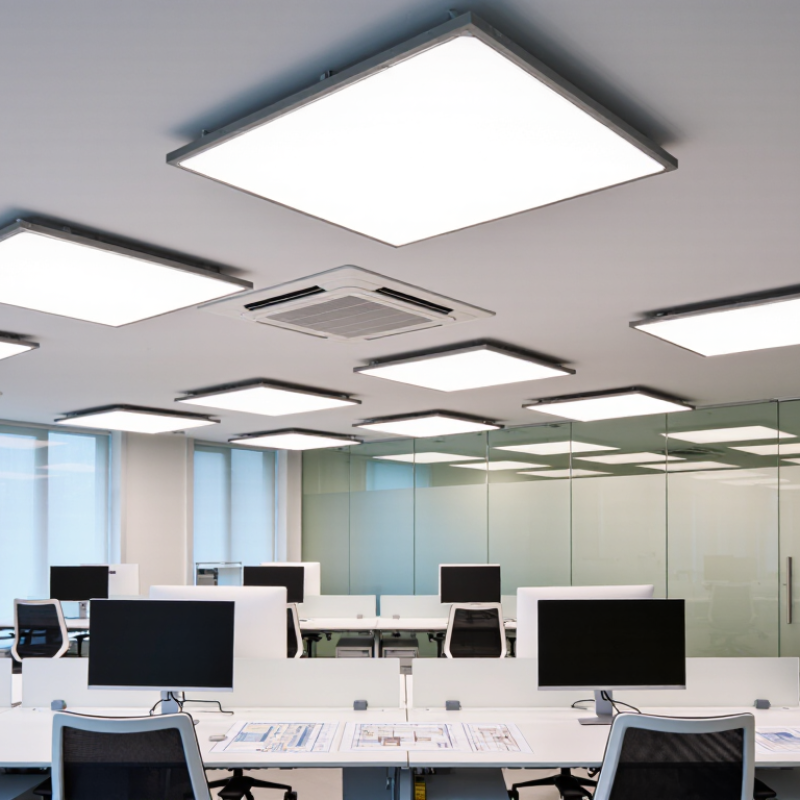
China Best UGR 19 Anti Glare Lighting Benefits?

What UGR 19 Means in Anti-Glare Lighting

China Best UGR 19 Anti Glare Lighting Benefits?

What UGR 19 Means in Anti-Glare Lighting

UGR means Unified Glare Rating, a method for estimating discomfort glare from indoor lighting. A UGR value of 19 is often used as a design target for offices and other visual workspaces. It does not mean glare disappears. It suggests glare should remain limited under specified room and viewing conditions.

The rating depends on more than the light fitting. Room dimensions, ceiling and wall finishes, fixture positions, and the viewer’s direction all affect the result. For example, a bright panel directly above a computer screen may feel uncomfortable, even when a lighting plan lists UGR 19. That gap matters. A rating is useful, but it cannot describe every person’s experience or every installation.

Tips: Check the UGR table for the actual room layout, not just a product label. Place fixtures outside common screen reflections, and test the lighting from seated eye level. If glare remains, adjust spacing or brightness. Real rooms can be imperfect, so review the result after installation.

How UGR 19 Lighting Helps Reduce Visual Discomfort

How UGR 19 Lighting Helps Reduce Visual Discomfort

UGR 19 lighting can help limit discomfort from bright luminaires in offices, classrooms, and other work areas. The Unified Glare Rating is not a measure of eye health or a guarantee of comfort. It estimates discomfort glare using factors such as luminaire brightness, apparent size, position, and surrounding light. CIE 117:1995 describes this calculation method. That matters.

EN 12464-1:2021 lists a UGR limit of 19 for many office tasks, including reading, writing, and data processing. In practice, that target works best when luminaires are positioned outside common sightlines and light is spread evenly across desks. Imagine looking up from a spreadsheet: a bright panel directly above the monitor can still feel harsh, even when a design meets the rating.

UGR does not fully describe reflected glare from glossy screens or polished desk surfaces. So check the room from seated eye level, not only from the lighting plan. A matte finish, suitable shielding, and balanced ambient light can help. The rating is useful, but real comfort still depends on the room and the person using it.

Key Benefits of UGR 19 Lighting in Workspaces

UGR 19 lighting can make desk work more comfortable by limiting disturbing glare from visible luminaires. The number is a threshold, not a promise of glare-free vision. CIE 117:1995 defines the Unified Glare Rating method, which considers luminaire brightness, position, and room conditions. That context matters.

For office tasks such as reading, writing, and computer work, EN 12464-1:2021 specifies a UGR limit of 19 and a maintained illuminance of 500 lux. In practice, this supports clear visibility across a desk without making bright fixtures the main thing employees notice. A well-designed layout also considers screen reflections, ceiling height, and light distribution. Standards guide the design; they cannot fix every room.

Picture a worker reviewing figures on a monitor beside a bright window. Controlled glare can reduce distracting reflections and visual discomfort during sustained tasks. Small detail. UGR 19 does not guarantee higher productivity or prevent eye strain, and individual comfort varies. Measure the installed lighting, check viewing angles, and ask occupants how the space feels. One weak point: a compliant reading can still feel harsh if the room’s surfaces are poorly balanced.

Where UGR 19 Luminaires Are Most Suitable

UGR 19 luminaires are well suited to offices where people read, write, and work at screens for long periods. EN 12464-1:2021 sets a UGR limit of 19 for these office tasks. It is a useful benchmark. In practice, workers benefit most when luminaires are positioned outside direct lines of sight and do not create bright reflections on monitors.

Classrooms, meeting rooms, and design studios can also use UGR 19 lighting when occupants face screens or detailed paper work. The CIE 117:1995 method calculates discomfort glare from a lighting installation, considering factors such as luminaire brightness, room surfaces, and viewing position. Not a product guarantee. A luminaire marked “UGR 19” cannot ensure the same result in every room; ceiling height, spacing, desk layout, and wall reflectance all affect the calculation.

For a practical check, review the manufacturer’s photometric files and assess the proposed layout for typical seated viewing angles. Also inspect the room at screen height: a pale ceiling, glossy desk, or window behind a display may still cause discomfort. UGR addresses discomfort glare from luminaires, not every source of visual strain. Small details matter.

China Best UGR 19 Anti Glare Lighting Benefits? - Where UGR 19 Luminaires Are Most Suitable
Application Why UGR 19 May Be Suitable Potential Benefits Design Considerations
Offices and computer workstations Office tasks such as reading, writing, and data processing commonly use a UGR limit of 19 in lighting design guidance. Well-controlled discomfort glare can support visual comfort during sustained desk work. Check the complete room layout, luminaire spacing, screen positions, and viewing directions; a product label alone does not establish the room’s UGR.
Classrooms and training rooms It can be appropriate where occupants read, write, and view teaching materials for extended periods. Reduced discomfort glare may help students and instructors maintain visual comfort. Consider board and screen reflections, daylight, dimming needs, and the applicable lighting requirements for the specific teaching activity.
Meeting and conference rooms A low-glare design can suit rooms used for note-taking, discussions, and viewing displays. Careful glare control can make it more comfortable to look around the room and toward presentation areas. Plan for multiple seated viewing directions and avoid reflections on glossy tables and display screens.
Design, drafting, and technical work areas It may be suitable where detailed visual work takes place at desks and glare control is important. A balanced lighting scheme can improve visual comfort while supporting detailed tasks. UGR is only one design factor; also assess task illuminance, uniformity, colour quality, shadows, and reflections on drawings or monitors.
Control rooms and monitoring spaces Low-glare lighting can be useful where staff look between work surfaces and display screens over long periods. Appropriate glare management may reduce distracting bright reflections and support comfortable screen viewing. Use a project-specific layout and check screen reflections, ambient light levels, task needs, and control-system requirements.
Areas where UGR 19 should not be assumed Some spaces and tasks have different glare limits or priorities; a UGR 19 target is not suitable by default for every application. Selecting criteria for the actual task helps avoid over-relying on a single glare rating. Review the applicable standard and project brief for spaces such as healthcare, industrial, retail, or circulation areas before specifying luminaires.
Important: UGR (Unified Glare Rating) describes discomfort glare for a lighting installation under specified conditions. The result depends on factors including room dimensions, surface reflectances, luminaire position and light distribution, and observer location. “UGR 19” is not a guarantee that every installation will achieve UGR ≤ 19; verify the design with an appropriate calculation and the applicable lighting standard.

How to Choose UGR 19 Lighting from Chinese Manufacturers

How to Choose UGR 19 Lighting from Chinese Manufacturers

When comparing Chinese manufacturers, treat UGR 19 as a design target, not a feature guaranteed by a lamp alone. Glare results depend on room dimensions, ceiling height, surface reflectance, and fixture spacing. Ask for a UGR table matched to your planned layout, plus photometric files such as IES or LDT. Numbers need context. A catalogue claim without assumptions may not predict the result in your office.

Check the technical details behind the offer. Compare beam angle, luminance control, color temperature, CRI, flicker performance, and driver specifications. Request test reports tied to the exact model, and confirm whether reports come from an independent laboratory. Ask about sample availability, production tolerances, warranty terms, and replacement-part support. A neat sample is useful, but it cannot prove every production batch will perform identically. I would verify that point before placing a large order.

Tips: Send manufacturers a simple room plan with dimensions, ceiling height, desk positions, and surface finishes. Ask them to calculate the proposed layout and state the assumptions. Compare responses, not just prices. If a supplier cannot explain how its UGR figure was obtained, pause and request clarification.

China Best UGR 19 Anti-Glare Lighting Benefits? How to Choose UGR 19 Lighting from Chinese Manufacturers

Typical maximum Unified Glare Rating (UGRL) limits for selected indoor activities

Lower UGR values indicate less discomfort glare. UGR 19 is a commonly specified limit for office work and classrooms; it is not a guarantee that a luminaire will achieve that result in every installation. When comparing manufacturers, check photometric files, optics, installation layout, and project-specific UGR calculations against the applicable lighting standard.

FAQS

Where are UGR 19 luminaires most suitable?

They suit offices where people read, write, and use screens for long periods. Good fit.

Can classrooms and meeting rooms use UGR 19 lighting?

Yes. It can work well where people view screens or detailed paperwork. Check the seating angles and room layout.

Does a UGR 19 label guarantee low glare in every room?

No. Ceiling height, fixture spacing, desk positions, and wall finishes affect the result. A label alone is not proof.

What details influence glare calculations?

Luminaire brightness, room surfaces, and viewing positions matter. A glossy desk or pale ceiling can change what people see.

What should I request from a manufacturer?

Ask for a UGR table based on your room plan and photometric files. Include room dimensions, ceiling height, desks, and surface finishes.

Which technical specifications are worth comparing?

Review beam angle, color temperature, color rendering, flicker performance, and driver details. Small differences can matter.

How can I check for glare before ordering?

Assess the proposed layout from typical seated positions. Inspect the room at screen height, where reflections may be easy to miss.

Does a sample prove that every production batch will perform the same?

No. Request test reports for the exact model, and ask about production tolerances. A neat sample is useful, but I would still verify batch consistency.

Conclusion

UGR 19 is a lighting glare rating commonly used to describe visual comfort in indoor spaces; a lower value generally indicates less discomfort from direct or reflected glare. What are the benefits of UGR<19 anti-glare lighting? It can help create a more comfortable visual environment, reduce distracting brightness, and support concentration during tasks that require sustained attention. Actual results depend on the luminaire, room layout, surface finishes, and installation, so a UGR rating should be considered alongside the complete lighting design.

UGR 19 luminaires are often suitable for offices, classrooms, meeting rooms, and other workspaces where people read, use screens, or perform detailed tasks. When choosing lighting from Chinese manufacturers, compare photometric data for the intended room, check product specifications and relevant test documentation, and consider light distribution, flicker performance, color quality, energy use, and warranty support. Matching the fixture to the application is essential for achieving comfortable, effective illumination.

Charlotte

Charlotte

Charlotte is a seasoned marketing professional with a deep understanding of the company's portfolio and a passion for elevating its presence in the market. With a keen eye for detail and a commitment to excellence, she ensures that our professional blog is regularly updated with insightful articles......